A customer asks on WhatsApp and nobody records the enquiry.
The Product
Octave One
One system that runs the whole business: customer conversations, sales, invoices, stock, projects, hiring and payroll. One sign-in, one sidebar, one set of permissions.
The Problem It Removes
Five Tools, Five Logins,
Five Tools, Five Logins,
No Single Truth
Most growing businesses run on a spreadsheet for leads, chat apps for customers, a billing app for invoices, an HR tool for people and a notebook for stock. Each one holds part of the picture and none of them agree. The cost shows up every day.
A deal is won, then the invoice is typed again from scratch.
Stock runs out because the sale never reached the stock sheet.
A new hire’s details are entered once for the offer and again for payroll.
Octave One removes the copying
A lead converts into a contact and a deal. A sale updates the books and the stock by itself. An accepted offer becomes the employee’s onboarding record. The details are typed once and every module reads the same record.
01 — Reach
Every Customer Channel
Every Customer Channel
In One Inbox
Reach connects the channels your customers already use directly to Octave One, through each platform’s official API. There is no third-party connector in between.
- Inbox. Every message from every channel lands in one list. A conversation can be assigned to a teammate, snoozed or closed.
- Posts. Write once, choose the accounts, and publish now or schedule it. A post can require approval before it goes out.
- Apps. Each platform also opens as its own screen, laid out the way that platform looks, with its real profile picture, cover and follower count.
- Performance. Reach, likes, comments and clicks per post, pulled back from the platforms.
 WhatsAppReceive and answer business messages, with pictures and documents
 InstagramPublish posts, answer comments and direct messages
 FacebookPublish to a Page, answer comments and Messenger
 LinkedInPublish to a company page or a personal profile
 YouTubeConnect a channel
 EmailSend and receive from a shared mailbox, threaded into conversations
Website formEnquiries from your site arrive as conversations
02 — CRM
From Enquiry To Won
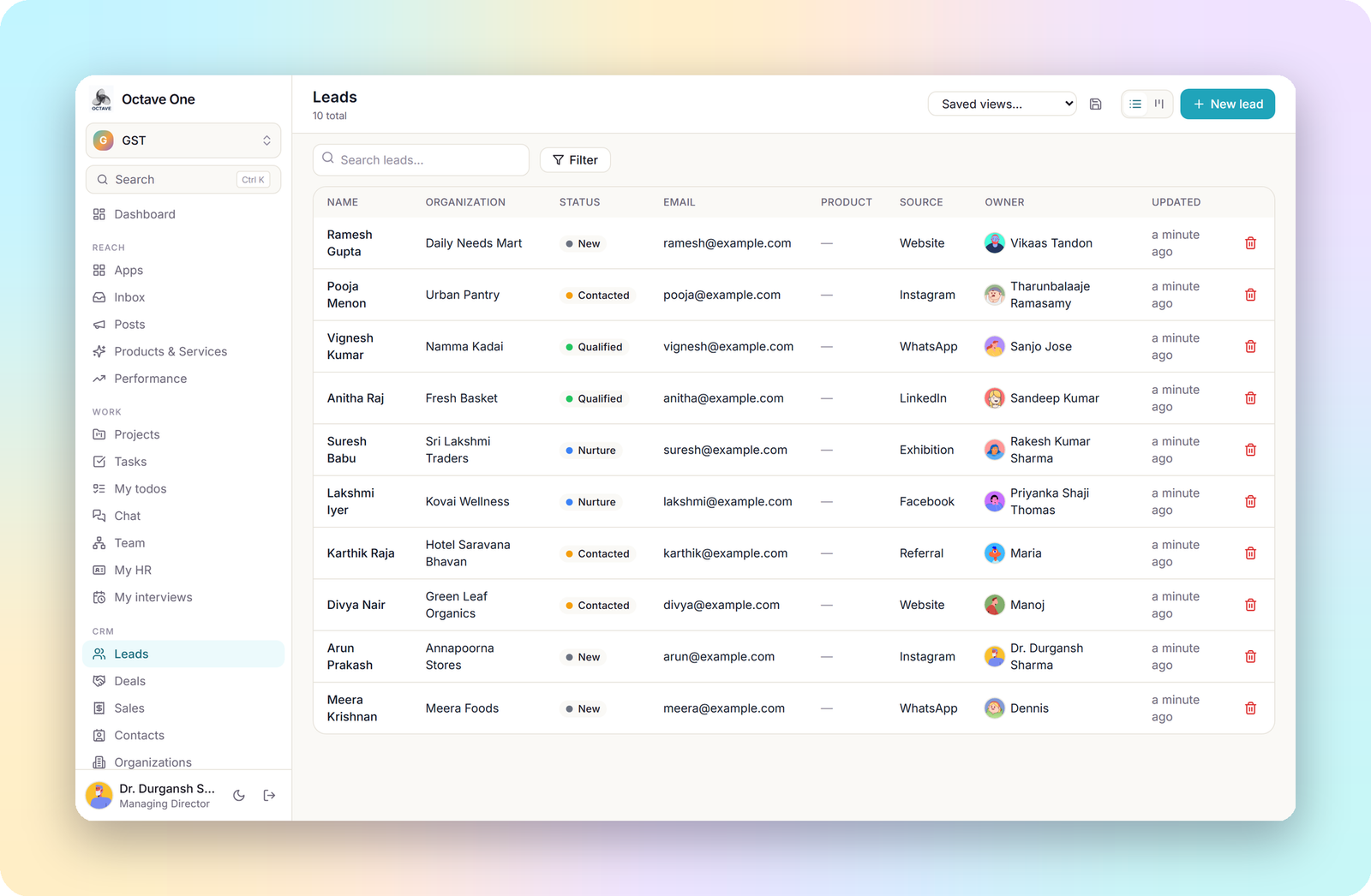
The CRM follows a customer from the first enquiry to a closed deal, and keeps everything said and done along the way on the record.
- Leads. Every enquiry with its source, owner and status. View them as a list or a board, filter them, and save the views you use.
- Deals. A board with your own stages. Drag a deal from Qualification to Won and the value in each column adds itself up.
- Contacts and organizations. The people and companies behind the deals, each with their full history.
- Notes, tasks, comments and call logs attach to any lead or deal, so a colleague can pick it up without asking.
- Custom fields, pipeline stages and email templates are set by you.

03 — Sales, Accounting & GST
A Sale Posts Itself
A Sale Posts Itself
To The Books
Accounting is double entry underneath, but the person raising an invoice does not need to know that.
Sales
Record a sale against a customer, at the counter or at an event stall, with the payment mode. Stall sales have their own phone-sized till and a cash count at the end of the day.
Invoices & Bills
Sales invoices and purchase bills with line items, payments and what is still outstanding.
GST
The company’s GSTIN and state decide whether an invoice splits into CGST and SGST or carries IGST. A GST view summarises what was collected and what was paid.
Ledger & Reports
A chart of accounts, a journal, and reports drawn from them. Accounting periods can be closed so past months stay as they were.
04 — Stock & Procurement
Stock Counts Itself
Stock Counts Itself
As It Sells
Stock is counted as it sells, and buying more starts from the same screen.
- Products and stock. Every product with its variant, SKU, unit, price and GST rate. Stock goes down with each sale and up with each receipt, and every movement keeps its reason.
- Stock counts. Count what is on the shelf and correct the system in one step.
- Vendors. A directory of suppliers with what each one sells, at what price and lead time.
- Purchase orders. Raise an order to a vendor, receive it in full or in part, and the stock updates as it arrives.

05 — Projects, Tasks & Chat
The Work Lives
The Work Lives
Beside The Sale
The work that follows a sale sits next to the sale that created it.
- Projects. Each product line or client engagement is a project, with sub-projects, members, milestones and a delivery stage from planning to launch.
- Tasks. Assign work with a priority and due date, track it on a board, and link a task to the lead or deal it came from.
- Todo lists. Personal checklists for the things only you need to remember.
- Chat. Direct and group conversations inside the product, with presence, so a question about a deal is asked next to the deal.
- Team. The reporting line as an org chart and a directory.

06 — People
Hiring, HR And Payroll
Hiring, HR And Payroll
On One Record
A person’s record starts when they apply and continues through to their monthly payslip, without being typed again at any step.
Recruitment
- Openings with the number of positions, salary range, hiring manager and target date.
- A pipeline board for each opening: Applied, Screening, Interview, Offer, Hired. Rejecting a candidate asks for a reason, which the reports are built on.
- Candidates with their resume, skills, notice period and expected pay, a duplicate check on email and phone, and a talent pool for people worth calling back.
- Interviews and scorecards. Schedule a round with a panel. Each interviewer is notified and fills in their own scorecard, and never sees the salary or the offer.
- Offers are drafted, approved by somebody other than the person who asked, sent and answered, and print as an offer letter.
- One step to onboarding. An accepted offer creates the onboarding record with name, designation, manager, joining date and pay already filled in.
- Calendar. Add an interview to Google Calendar in one click, or subscribe once and every interview appears in Google, Outlook or Apple Calendar.


HR and payroll
Onboarding
A checklist of tasks and documents for each new hire. Completing it creates their login, their place in the company and their opening salary structure in one step.
Attendance
Marked by HR, by a supervisor, or by staff themselves from their phone with location.
Leave
Leave types, balances, requests and approvals, with company holidays.
Payroll
Salary structures with history, a monthly run built from attendance and leave, and a payslip for every employee.
My HR
Each employee sees their own attendance, leave and payslips, and nobody else’s.
Security & Access
Who Sees What
Who Sees What
Is Decided On The Server
Access follows the company a person belongs to and the permissions they hold. It is enforced on the server, not only hidden on screen.
Several companies, one account
A group runs each of its companies in the same system. A switcher sets which company you are working in, and records never cross between companies.
Permission sets
Ready-made sets such as Director, Manager, Sales Executive, HR, Accountant, Purchasing, Cashier, Storekeeper and Staff say what each person may view, create, edit, delete, export and approve in each module. An admin can clone one and change any line.
How far access reaches
A permission can cover only your own records, your company, or the whole group. Managers see their reports’ records through the reporting line.
Sensitive areas are separate
Salaries and offers sit behind HR access. A supervisor can mark attendance without seeing pay, and an interviewer can score a candidate without seeing the offer.
Each customer’s data is isolated
Every record carries the customer it belongs to, and every query is scoped to it.
Secrets are encrypted
Channel tokens and mailbox passwords are stored encrypted, are never returned by the API, and are never shown again after they are saved.
Where It Sits
One Product,
One Product,
Not One Per Department
Octave One follows the same idea as the large business suites: one account for the whole company. It is deliberately smaller and tighter, built around how an Indian trading or services company actually works: WhatsApp-first customers, GST invoices, rupee payroll and several companies under one group.
- Shape
- One product, one sign-in, one sidebar
- Modules
- Reach, CRM, Sales, Accounting and GST, Stock, Procurement, Projects, HR, Recruitment, Payroll
- Channels
- WhatsApp, Instagram, Facebook, LinkedIn, YouTube, email, website form
- Built for
- Small and mid-sized Indian businesses and groups of companies
- Plans
- Modules are switched on per plan; staff who only mark attendance and read payslips take a lighter seat
How to start
- 01Add your company, with its GSTIN if you invoice.
- 02Invite your team and give each person a permission set.
- 03Connect your first channel in Reach.
- 04Add your products and opening stock.
- 05Bring in your leads and start working them on the board.
Octave One
Run The Whole Business
Run The Whole Business
From One Sidebar
Sign in if your company is already on Octave One, or talk to us and we will set it up around the way your business works.